A boutique website is not the internet equivalent of a big-box store. It is closer to a beautifully arranged studio window: every color, photo, sentence, and button is chosen on purpose. If you want a site that feels tailored instead of template-shaped, this guide walks through the process without turning it into a manual written by a haunted printer.
Whether you are building for a fashion label, a floral studio, an illustrator, a candle shop, or a personality-led service brand, the same principle applies: the site should feel like an extension of the brand, not a separate department that showed up late with mismatched shoes.
For broader planning context, teams can compare guidance from Google Search Central before choosing a workflow.
What Is a Boutique Website?
A boutique website is a focused, style-conscious site built around a specific brand personality, audience, and offer. It does not try to be everything for everyone. Instead, it aims to feel distinctive, polished, and memorable for the right people.
That niche focus is the secret sauce. A boutique site knows who it is talking to and what mood it wants to create. It often has tighter messaging, stronger visuals, and a more thoughtful browsing experience than a generic business site.
Examples of successful boutique websites usually share a few traits even when the industries differ. A handmade jewelry shop may lean on editorial photography and soft storytelling. A wedding stationery studio might guide visitors through portfolios, pricing ranges, and a friendly inquiry flow. An illustrator’s site may use playful layouts, custom graphics, and a clear path to book commissions. Different products, same idea: the site feels curated.
Related implementation details are also covered in WordPress documentation, which helps keep tool decisions grounded in established practices.
Key Features of Boutique Websites
Think of these features as the difference between a custom cake and a grocery-store sheet cake. Both are technically cake. One of them just has more intention.
Custom Design Elements
Boutique websites usually include visual details that feel brand-specific: typography with personality, refined color choices, illustration accents, layered imagery, and section layouts that support the story instead of fighting it.
User-Friendly Navigation
Pretty should never mean puzzling. Visitors should be able to find services, products, pricing cues, and contact options without playing detective. Keep the menu simple, label pages in plain English, and make the next action obvious.
Responsive Design
If your site looks lovely on a laptop and chaotic on a phone, that is not boutique. That is a plot twist. Boutique audiences often browse on mobile first, so layouts, spacing, tap targets, and image scaling need to stay graceful on small screens.
Brand Storytelling
The strongest boutique sites do not just display products or services. They tell visitors what the brand stands for, who it serves, and why the experience feels different. This is where photography, microcopy, testimonials, and page rhythm work together.
- A strong hero section that states the value clearly
- Consistent imagery and styling from top to bottom
- Clear calls to action that match the tone of the brand
- Enough whitespace to make the content feel curated, not crowded
Choosing the Right Platform
The platform is the stage, not the performance, but a shaky stage still ruins the dance recital. Choose based on how much control you need, how often content changes, and whether you need ecommerce, blogging, or advanced customization.
| Platform | Best for | Strength | Watch-out |
|---|---|---|---|
| WordPress | Content-rich boutique brands and service businesses | Flexible design, blogging, and SEO control | Needs thoughtful setup to stay tidy |
| Squarespace | Visual brands that want speed and simplicity | Fast launch with polished templates | Customization can hit a ceiling |
| Shopify | Product-heavy boutiques and online shops | Strong ecommerce tools and checkout flow | Content storytelling can need extra design work |
| Webflow | Design-led brands that want precise visual control | Highly custom layouts and interactions | Steeper learning curve for content management |
When comparing platforms, ask three practical questions:
- Can I customize the brand experience without wrestling the software every week?
- Can I update content, products, or blog posts without summoning a developer for every comma?
- Will this platform still fit when the business grows, adds offers, or needs better SEO?
If you want a useful side read on how newer builders are changing the template landscape, this article on AI web builders becoming the new website templates adds helpful context to that decision.
For businesses that want a more guided custom process instead of a DIY maze, the services path can help clarify what should be handled by the platform and what should be shaped by design strategy.
Designing for Your Target Audience
This is where boutique websites either become magnetic or accidentally decorate themselves into confusion. Design choices should match the people you want to attract, not just your own Pinterest board on a particularly caffeinated afternoon.
Identify Your Core Audience
Start with simple questions: Who is buying? What are they trying to solve? What tone do they trust? A boutique skincare brand serving minimalist shoppers will not use the same visual language as a playful stationery studio selling to brides, creators, and gift buyers.
Create a Working Persona
You do not need a 47-slide persona deck. One useful profile is enough to guide choices. Example:
Maya, 34, boutique owner. She values polished visuals, wants a site that feels premium but warm, and needs an easy way to update seasonal collections. She browses on mobile first, notices sloppy spacing instantly, and will absolutely leave if the inquiry form feels annoying.
That kind of profile helps you make better calls about tone, photography, layout, and conversion points.
Design Tips That Actually Resonate
- Use brand colors with restraint so the site feels intentional instead of sugar-rushed.
- Choose fonts that fit the audience and stay readable on phones.
- Show real offers, pricing cues, or process steps early so visitors know they are in the right place.
- Use photos, illustrations, or graphics that reinforce the brand world rather than filling space.
- Keep inquiry buttons, shop links, or booking prompts visible throughout the page.
If you already know the site needs a more tailored visual direction, the contact page is the shortest path to a conversation about audience fit, styling, and content flow.
SEO Tips for Boutique Websites
SEO for boutique sites is less about shouting into the void and more about being discoverable by the right people. You are not trying to win every search. You are trying to win the searches that match your niche, your offer, and your style.
Start With Niche Keywords
Go narrower than broad phrases like “web design” or “online store.” Better targets sound like real buyer language: “boutique web designer,” “custom website for handmade shop,” “feminine brand website,” or “illustrator portfolio design.” Specific phrases bring more qualified visitors.
Clean Up On-Page Basics
- Use one clear page topic per page or post
- Write descriptive title tags and meta descriptions
- Use headings that help readers scan quickly
- Name images clearly and add honest alt text
- Link related pages together so visitors and search engines can follow the structure
Publish Helpful Content
Boutique websites often punch above their weight when they publish focused articles, lookbooks, process guides, FAQs, or launch tips. Helpful content builds trust, gives search engines more context, and creates more entry points into the site.
Earn Quality Backlinks
Links still matter, but quality beats quantity. A mention from a design directory, a niche publication, a collaborator, or a client feature page is worth far more than random internet confetti. Build relationships, share useful work, and make your content worth referencing.
Conclusion and Next Steps
Creating a boutique website is really about alignment. The design should match the brand. The platform should match the workflow. The content should match the audience. And the SEO should help the right people find it without draining the personality out of the site.
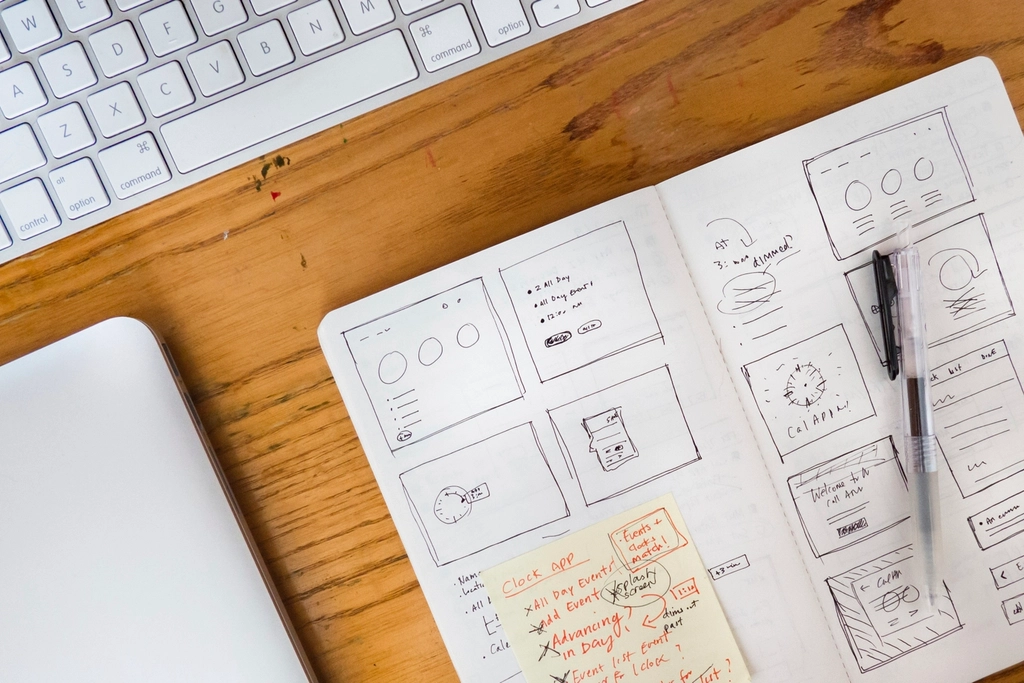
If you are starting from scratch, try this once: sketch the homepage before you pick the final platform. Map the hero message, the offer, the proof, and the call to action. That tiny exercise reveals a surprising amount of the boring magic and saves a lot of interface friction later.
When the goal is a site that feels polished, personal, and easier to maintain, boutique thinking wins. Less clutter. More clarity. Better fit.